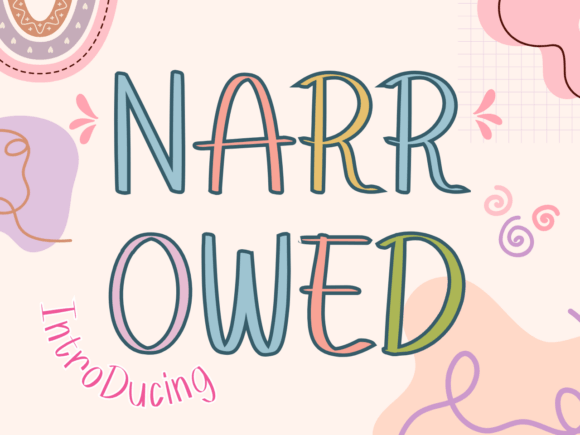
Say Hello to Narrowed – A Playful Font for Creative Projects
If you're looking for a font that adds a touch of whimsy and personality to your design work, Narrowed might just be the perfect fit. This hand-drawn display font stands out with its tall, slender silhouette and quirky character. Whether you're designing for children, crafting playful branding, or working on a scrapbooking layout, Narrowed brings a cheerful and approachable energy to your visuals.
Understanding Narrowed in the Design Workflow
Before diving into how to use Narrowed, it's helpful to understand where it fits within a broader creative process. Typography is more than just choosing a pretty font—it's about setting the tone, enhancing readability, and supporting your message. Narrowed excels in projects where a lighthearted, expressive tone is needed. Its unique character makes it ideal for headlines, logos, and design accents where you want to draw attention without overwhelming the layout.
From a planning standpoint, integrating Narrowed early in your design phase ensures consistency and visual harmony. Consider how it will pair with other fonts, colors, and imagery. Because of its playful nature, it works best when balanced with simpler, more structured elements to maintain readability and professionalism.
How Narrowed Fits Into Real-World Applications
Let’s explore how Narrowed can be used across different stages of a project:
- Pre-Design Phase: During brainstorming and moodboarding, Narrowed can help set the tone for a project. If you're working on a children's book layout or a brand refresh for a toy store, sketching with Narrowed in mind gives you a sense of how the typography will influence the overall feel.
- Design Execution: During the actual design process, Narrowed shines in headline text, feature titles, and call-out quotes. Its tall structure and hand-drawn look make it ideal for posters, greeting cards, digital illustrations, and social media graphics where a fun and friendly tone is key.
- Post-Production: After the main visuals are complete, Narrowed can be used to add finishing touches—think captions, labels, or even decorative elements in digital or print layouts. It can also be useful in packaging design, especially for products targeting younger audiences or those with a playful brand identity.
Pairing Narrowed with Other Tools and Assets
One of the strengths of Narrowed is its versatility in working alongside other design tools and assets. Whether you're using Adobe Illustrator, Canva, Figma, or Procreate, this font integrates smoothly into most platforms. When choosing complementary fonts, opt for clean sans-serif or serif typefaces to create visual contrast without clashing.
For example, if you're designing a logo for a children’s clothing brand, using Narrowed for the brand name and pairing it with a simple, modern sans-serif like Open Sans or Montserrat for supporting text creates a balanced and appealing look. Similarly, in digital design workflows, Narrowed can be used in Figma or Sketch for UI elements that need a touch of playfulness without sacrificing clarity.
Practical Tips for Using Narrowed Effectively
To get the most out of Narrowed, consider the following tips as part of your design process:
- Use at Appropriate Sizes: Due to its slender structure, Narrowed works best at larger sizes. Avoid using it in small body text where legibility may suffer.
- Limit Its Use: As with any display font, use Narrowed sparingly. Overuse can lead to visual clutter and reduce readability. Stick to headlines, titles, and short phrases where it can stand out.
- Adjust Kerning and Spacing: Depending on your design software, you may need to fine-tune the spacing between letters to ensure optimal readability and visual appeal, especially in all-caps settings.
- Consider Color and Background: Narrowed’s hand-drawn quality looks best when placed against clean, simple backgrounds. If you're using it in a busy or textured layout, consider using a drop shadow or outline to help it pop.
- Test Across Mediums: Before finalizing your design, test how Narrowed appears in different formats—digital, print, and even embroidered or laser-cut applications if you're using it in physical products.
Workflow Integration and Long-Term Use
For professionals and creatives who work on multiple projects, establishing a consistent workflow that includes Narrowed can save time and improve design quality. Consider creating reusable templates or style guides that include Narrowed for specific use cases. This helps maintain brand consistency while streamlining the design process.
If you're a small business owner or marketer creating social media content regularly, having a preset template in Canva or Photoshop with Narrowed already styled can speed up your workflow. Similarly, educators or bloggers can use Narrowed in infographics or blog headers to maintain a cohesive and engaging visual style across their content.
Real-World Examples of Narrowed in Action
Here are a few practical use cases where Narrowed has proven to be a valuable design asset:
- Children’s Book Covers: The tall, playful letters of Narrowed make it a natural choice for book titles aimed at younger readers. It helps create a sense of fun and imagination before the reader even opens the book.
- Event Invitations: Whether it's a birthday party or a baby shower, Narrowed adds a whimsical and personal touch to invitation cards and digital announcements.
- Branding for Creative Businesses: Small businesses in creative industries—such as art studios, craft shops, or boutique toy stores—can use Narrowed to reinforce a friendly and approachable brand identity.
- Scrapbooking and DIY Projects: Narrowed’s hand-drawn look complements scrapbook pages, handmade cards, and custom stickers, making it a favorite among hobbyists and crafters.
Preparing for Smooth Implementation
Like any design element, successful use of Narrowed depends on preparation and thoughtful planning. Here are a few steps to ensure smooth implementation:
- Review Licensing: Make sure the version of Narrowed you're using is properly licensed for your intended use—whether it's for personal, commercial, or web-based projects.
- Check Compatibility: Verify that the font works across your preferred platforms and devices. Some hand-drawn fonts may not render consistently on all screens or printers.
- Organize Your Assets: Keep Narrowed in an organized font library or folder so it's easy to access when needed. If you're working in a team, share the font file and usage guidelines to maintain consistency.
Quality Control and Long-Term Maintenance
As you incorporate Narrowed into ongoing projects, it's important to perform regular quality checks. Ensure that the font remains legible across different formats and that it continues to align with your brand or design goals. If you're using it in a long-term branding project, revisit how it's being used annually to ensure it still fits your evolving style and audience.
Also, keep an eye out for updates or alternative versions of the font from the designer. Sometimes, newer versions include improved spacing, additional characters, or alternate styles that can enhance your designs.
Conclusion
Incorporating Narrowed into your design process doesn’t have to be complicated. With its unique charm and versatility, it offers a fresh and expressive option for designers, marketers, educators, and creators who want to inject personality into their work. By understanding how it fits into your workflow, preparing for smooth integration, and using it thoughtfully across your projects, you can make the most of this delightful display font without sacrificing clarity or professionalism.