Outlook: A Stylish and Readable Display Font for Modern Design
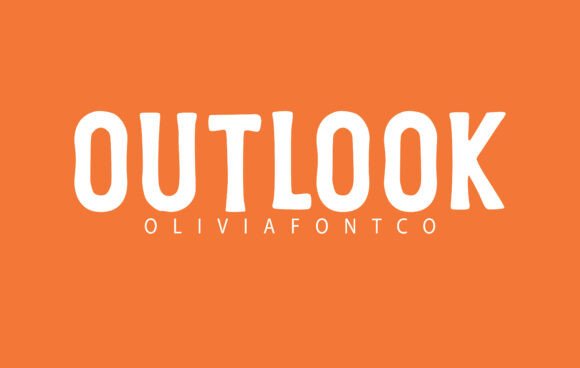
Outlook is a tall, clean display font that blends a subtle retro aesthetic with modern readability. Its design features slightly elongated letterforms and crisp lines, making it a versatile option for visual projects that require both personality and clarity. Whether used in print or digital media, Outlook offers a distinctive presence that stands out in large-format applications.
Understanding Outlook’s Design Characteristics
At its core, Outlook is a sans-serif typeface designed for display use. Its tall x-height contributes to strong legibility, especially at larger sizes. The font’s subtle retro undertones come from its slightly tapered strokes and nuanced letter shapes, which evoke a sense of mid-century design without appearing outdated.
Unlike many retro-inspired fonts that lean heavily into nostalgia, Outlook balances vintage charm with a minimalist aesthetic. This makes it suitable for contemporary applications that benefit from a touch of personality without sacrificing professionalism.
Why Designers Choose Outlook
Designers often turn to Outlook when they need a font that commands attention while maintaining clarity. Its stretched proportions give it a unique visual rhythm, making it ideal for use in:
- Posters and event promotions
- Product packaging and branding
- Editorial headlines and magazine covers
- Lifestyle and fashion-related design projects
One of the key advantages of Outlook is its ability to maintain legibility even when stylized. This makes it a strong contender for projects that require a bold typographic presence without compromising readability.
Key Benefits of Using Outlook
Outlook offers several practical benefits that make it a compelling choice for a variety of design contexts:
- Strong Visual Identity: Its tall, distinctive letterforms help create a memorable visual impression.
- Readability at Scale: Designed for large sizes, Outlook retains clarity and definition even when used prominently.
- Modern Yet Timeless: The font’s restrained retro style gives it a timeless appeal that avoids looking overly dated.
- Minimalist Aesthetic: Its clean lines and open shapes allow for seamless integration into modern layouts.
These features make Outlook particularly well-suited for branding and editorial design where typographic clarity and style are equally important.
Considerations and Tradeoffs
While Outlook excels in many areas, it’s important to understand its limitations to ensure it aligns with your design goals:
- Not Ideal for Body Text: As a display font, Outlook is best reserved for headlines and titles. Its stretched proportions can reduce readability in long-form text.
- Limited Weight Options: Depending on the version used, Outlook may not offer a full range of weights, which can limit typographic flexibility.
- Context-Dependent Style: While its retro undertones are subtle, they may not fit every design brief—especially those requiring a purely modern or neutral aesthetic.
Designers should evaluate how Outlook interacts with other typographic and visual elements in a layout to ensure overall harmony and readability.
When Outlook Is a Strong Fit
Outlook shines in applications where typography plays a central role in communication. It works particularly well in the following scenarios:
- Brand Identity: For lifestyle, fashion, or boutique brands seeking a clean yet distinctive typographic voice.
- Advertising and Promotion: In posters, banners, and digital ads where strong visual impact is essential.
- Editorial Design: In magazine covers, headlines, or feature spreads that benefit from a tall, elegant typeface.
- Packaging Design: On product labels or packaging that requires a modern yet approachable look.
In each of these cases, Outlook’s combination of clarity, style, and character helps reinforce the intended message and tone.
When Alternatives May Be Worth Considering
Despite its strengths, Outlook may not be the best choice for every project. Consider alternative typefaces in the following situations:
- Technical or Corporate Documents: Fonts like Helvetica or Roboto may be more appropriate for formal or professional contexts.
- Extensive Body Text: For long-form reading, serif or more traditional sans-serif fonts such as Georgia or Lato may offer better legibility.
- Highly Decorative Needs: If a more dramatic or vintage-heavy style is desired, fonts like Bebas Neue or Cooper Black could be more fitting.
Choosing the right font involves more than aesthetics—it requires understanding how the typeface supports the message, medium, and audience.
Practical Insights for Evaluating Outlook
Before selecting Outlook for your next project, consider the following factors to ensure it aligns with your design goals:
- Test at Intended Size: Preview Outlook at the size it will be used—especially in print or on screen—to confirm clarity and impact.
- Pair Thoughtfully: Use complementary fonts for subheadings or body copy to maintain visual balance and hierarchy.
- Assess Context: Ensure the font’s subtle retro tone matches the tone and style of the brand or message.
- Check Licensing: Confirm that the version of Outlook you plan to use is appropriately licensed for your intended application.
These steps help ensure that Outlook enhances your design rather than detracts from it due to mismatched context or application.
Conclusion: Is Outlook Right for Your Project?
Outlook is a tall, clean, and stylish display font that brings a modern-retro vibe to a wide range of design applications. Its strength lies in its ability to stand out without overwhelming a layout, making it a practical choice for designers seeking a bold yet legible typeface.
It is especially well-suited for headlines, branding, and promotional materials where typographic presence is key. However, it’s not a one-size-fits-all solution—its stretched form and stylistic nuances mean it should be used intentionally and in the right context.
If your project calls for a tall, readable font with a hint of retro flair and a modern edge, Outlook is definitely worth considering. As with any design decision, the key is to evaluate it based on your specific needs, test it in context, and ensure it supports your overall visual and communicative goals.