Moth Morbidity Duo: A Distressed Grungy Halloween Font for Authentic Spooky Design
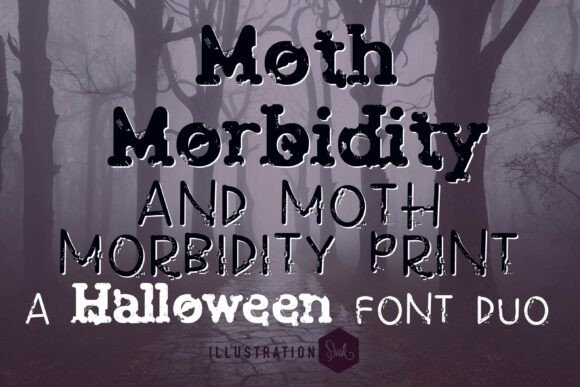
When it comes to Halloween-themed design, the right typography can make or break the mood. Moth Morbidity Duo, consisting of Moth Morbidity and Moth Morbidity Print, delivers a uniquely haunting aesthetic that blends grunge, decay, and vintage horror elements. Whether you're designing a podcast cover, a poster, or a product label, this font pair offers an eerie texture that evokes a sense of age and unease. But like any specialty font, using it effectively requires more than just downloading and applying it to your layout.
Understanding the Moth Morbidity Duo
The Moth Morbidity Duo is designed with two complementary styles. The main font, Moth Morbidity, features bold, eroded strokes and textured edges that suggest decay and distress. It's ideal for headlines, titles, and statements that need to stand out with a dark, unsettling presence. The second font, Moth Morbidity Print, is a rougher, hand-drawn variation that adds a tactile, imperfect quality to supporting text, captions, or layered design elements.
Together, they form a cohesive yet visually rich pairing that mimics the look of aged signage, cryptic notes, or old horror movie titles. This makes them especially useful for projects that aim to evoke fear, mystery, or nostalgia around Halloween or gothic themes.
Common Mistakes When Using Moth Morbidity Duo
While the Moth Morbidity fonts are powerful tools, they come with specific design considerations. Many users overlook these and end up with visuals that are hard to read, unprofessional, or underwhelming.
1. Overusing the Fonts in a Layout
One of the most frequent missteps is using Moth Morbidity for too much of the text in a design. Because of its textured, distressed appearance, this font works best for short bursts of text like headlines, titles, or key phrases. Using it for long paragraphs or body copy can make the content difficult to read and visually overwhelming.
Better approach: Reserve Moth Morbidity for headings and accents. Pair it with a clean sans-serif or serif font for supporting text to maintain readability while keeping the spooky tone intact.
2. Ignoring Kerning and Spacing Adjustments
Due to the irregular shapes and textures in Moth Morbidity, default spacing may not always produce the best visual results. Some letters might appear too close together or too far apart, creating an uneven or awkward look.
Better approach: Manually adjust the kerning and tracking to ensure a balanced appearance. This is especially important when using the font at large sizes or in prominent design elements like posters or banners.
3. Assuming It Works for Every Halloween Project
While Moth Morbidity is perfect for horror, gothic, or edgy themes, it may not suit more playful or family-friendly Halloween designs. Using it inappropriately can clash with the overall tone of your project.
Better approach: Match the font style to the project's mood. If you're designing a children's party invitation or a festive autumnal layout, consider a lighter, more whimsical font instead.
4. Not Checking Licensing Before Use
Many designers download fonts without reviewing the licensing terms. Moth Morbidity Duo, like most commercial fonts, likely has specific usage restrictions. Failing to comply can lead to legal issues or unexpected costs later.
Better approach: Always read the license agreement before downloading or purchasing. Ensure it allows for the type of use you have in mind, whether it's for print, web, merchandise, or commercial branding.
Practical Tips for Getting the Most from Moth Morbidity Duo
To use this font duo effectively, consider these real-world applications and adjustments that can enhance your design while avoiding common pitfalls.
- Use it in layered designs: Combine Moth Morbidity with background textures like old paper, cracks, or fog to enhance the haunted aesthetic.
- Limit color choices: Stick to dark, muted tones like black, deep red, or rust for maximum eerie effect. Avoid bright or neon colors unless you're going for a contrasting, stylized look.
- Test readability at different sizes: Moth Morbidity Print may lose clarity at very small sizes. Always preview your design at actual print or screen size before finalizing.
- Pair with complementary fonts: Try using Moth Morbidity as a headline and a simpler font like Helvetica Neue or Georgia for subheadings and body text.
What to Check Before Downloading or Purchasing
Before committing to Moth Morbidity Duo, make sure you're getting the right version for your needs. Some font marketplaces offer demo versions, which can be useful for testing.
Look for these key details:
- Availability of both Moth Morbidity and Moth Morbidity Print in the package.
- Clear information about supported languages and character sets.
- Licensing terms for commercial and personal use.
- Compatibility with your design software (e.g., Adobe Photoshop, Illustrator, Canva, etc.).
Final Thoughts
Moth Morbidity Duo offers a compelling blend of texture, style, and atmosphere that's hard to replicate with standard fonts. However, like any design tool, its effectiveness depends on how well it's applied. By understanding its strengths and limitations, you can avoid common mistakes and create Halloween-themed or gothic designs that are both visually striking and professionally executed.
Whether you're a small business owner crafting seasonal branding, a podcaster designing cover art, or a designer working on a horror-themed project, Moth Morbidity Duo can elevate your work—if used thoughtfully.