How Roselia Font Brings Personality and Clarity to Everyday Design Projects
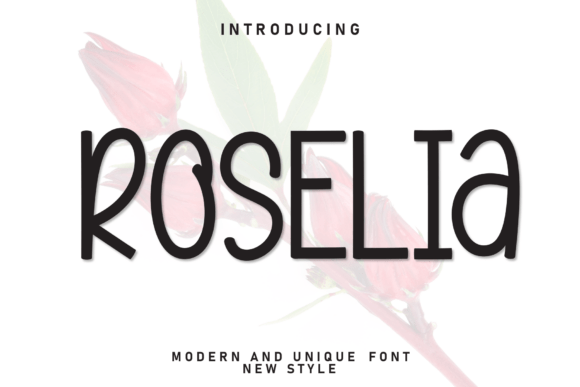
Whether you're creating a logo for your new side hustle, designing a social media post for your small business, or putting together a fun flyer for a local event, the right font can make all the difference. Roselia is a casual display font that effortlessly blends modern simplicity with a playful, approachable vibe. Its clean shapes, soft edges, and balanced letterforms make it stand out without overwhelming the viewer. More importantly, it keeps readability at the forefront, ensuring your message comes through clearly while still feeling fresh and friendly.
What Makes Roselia Stand Out
At first glance, Roselia feels familiar but distinctive. It’s not overly stylized like some decorative fonts, nor is it too rigid like many minimalist typefaces. Instead, it strikes a middle ground—soft enough for casual use, yet structured enough for professional applications. The rounded edges give it a warm, inviting feel, while the consistent spacing ensures legibility even at smaller sizes. This balance makes it ideal for a wide variety of uses, from digital graphics to printed materials.
When and Where to Use Roselia
One of the best things about Roselia is its versatility. It works well in both digital and physical formats, and its friendly tone makes it a go-to choice for projects that need to feel approachable without sacrificing clarity. Here are a few real-world situations where Roselia can really shine:
1. Branding for Small Businesses and Startups
Imagine you're launching a boutique coffee shop or a wellness brand aimed at young professionals. You want your branding to feel modern, but not cold. Roselia’s soft curves and clean lines can help create a logo, packaging label, or menu design that feels welcoming yet polished. It adds just enough character to stand out without veering into overly playful territory.
2. Social Media Graphics for Creators and Influencers
If you're a content creator or influencer, your visuals need to catch attention quickly. Roselia works well in quote graphics, Instagram stories, and YouTube thumbnails. Its clean, open design makes it easy to read on mobile screens, and the slightly casual tone helps your content feel more personable and less corporate. Pair it with bright colors or soft pastels depending on your aesthetic, and you’ve got a design that feels both intentional and effortless.
3. Educational Materials and Workshop Handouts
Teachers, coaches, and workshop facilitators often need materials that are both engaging and easy to read. Roselia can be used effectively in presentation slides, handouts, or even digital worksheets. It adds a touch of warmth that helps reduce the visual fatigue that comes with dense blocks of text. Whether you're designing a printable checklist or a course syllabus, Roselia helps keep the tone positive and approachable.
4. Product Packaging and Merchandise Design
For small business owners and indie creators, product packaging is an extension of brand identity. Roselia’s clean yet expressive style works well on product labels, greeting cards, and even custom apparel. It’s especially effective for lifestyle brands that want to communicate a sense of ease and authenticity. From tote bags to tea boxes, this font helps your packaging feel like a natural part of your brand story.
Who Benefits Most from Using Roselia
Roselia is particularly well-suited for people who need to communicate warmth and clarity without overcomplicating their designs. Here are a few user profiles that might find it especially useful:
- Freelance designers who want a flexible font that works across multiple client projects without requiring heavy customization.
- Small business owners looking to build a cohesive brand identity without hiring a professional designer.
- Content creators who need a consistent visual voice across their digital platforms.
- Event planners designing invitations or promotional materials that need to feel festive yet professional.
- Hobbyists working on personal projects like wedding signage, baby announcements, or DIY planners.
Things to Consider Before Using Roselia
While Roselia is a versatile font, it's not a one-size-fits-all solution. Here are a few practical considerations to keep in mind:
- Readability at different sizes: While Roselia performs well in medium to large sizes, it may not be the best choice for very small text like footnotes or long-form body copy.
- Font licensing: Always check the license before using Roselia for commercial projects. Some versions may be free for personal use but require a paid license for business applications.
- Pairing with other fonts: Roselia works best when paired with a more neutral sans-serif or serif font. Avoid combining it with other decorative fonts, which can create visual clutter.
- Color contrast: Because of its soft edges, Roselia may not stand out as strongly against busy or light-colored backgrounds. Make sure to test it in your intended layout before finalizing.
How Roselia Enhances the User Experience
Fonts do more than just look good—they influence how people feel about your content. Roselia’s approachable design makes it easier for your audience to connect with your message. Whether it’s used in a blog post graphic or a product label, it subtly signals that your brand or project is friendly, modern, and trustworthy. It’s the kind of font that doesn’t demand attention but earns it through thoughtful design and usability.
Final Thoughts: A Font That Fits Real Needs
Roselia isn’t just another trendy font—it’s a practical choice for anyone who wants to communicate warmth and clarity without sacrificing professionalism. Whether you're a blogger designing your next post, a teacher creating a visual aid, or a small business owner building your brand, Roselia offers a balance of style and functionality that’s hard to beat. And because it’s so adaptable, it grows with your needs, fitting into both one-off projects and long-term design systems. If you're looking for a font that feels both fresh and familiar, Roselia is definitely worth trying out.