Christmas California: A Festive Font with West Coast Flair
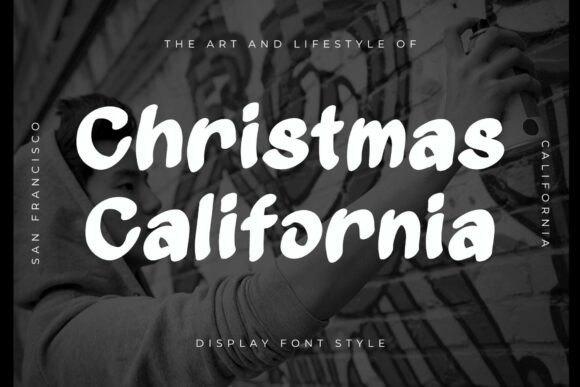
When it comes to holiday design, the right font can make all the difference. Christmas California is not just another seasonal typeface—it’s a bold, expressive display font that blends festive cheer with urban cool. With its smooth, rounded strokes and playful brush style, this font radiates warmth and creativity. Whether you're designing greeting cards, social media graphics, or merchandise, Christmas California adds a unique personality that’s both modern and heartfelt.
What Makes Christmas California Stand Out?
Unlike traditional holiday fonts that lean heavily on classic serif styles or overly ornate scripts, Christmas California strikes a balance between festive and contemporary. Its handcrafted appearance gives designs a personal, authentic touch, making it ideal for creators who want to stand out without straying too far from the holiday spirit. This font is especially popular among designers working on urban-inspired holiday content, blending West Coast energy with seasonal warmth.
Common Mistakes When Choosing or Using Christmas California
While Christmas California is a versatile and expressive font, it's not without its potential pitfalls. Many users—especially beginners—make common mistakes that can affect the clarity, professionalism, and effectiveness of their design.
Mistake #1: Using It for Body Text or Long Paragraphs
One of the most frequent errors is using Christmas California for body text or large blocks of copy. Its decorative style and brush-like strokes are designed for headlines and short phrases. Using it in long paragraphs can reduce readability and strain the viewer’s eyes.
Better approach: Stick to using Christmas California for titles, headers, or short slogans. Pair it with a clean sans-serif font like Montserrat or Open Sans for body text to maintain readability and visual harmony.
Mistake #2: Overusing It Across Multiple Design Elements
Another common issue is overusing the same font throughout a design. While Christmas California has a strong personality, using it for every element—buttons, captions, logos—can make your design feel cluttered and unbalanced.
Better approach: Use Christmas California strategically. Apply it to one or two key elements like a logo or a headline, and complement it with simpler fonts for supporting text. This creates visual hierarchy and keeps your design from feeling overwhelming.
Mistake #3: Assuming It Works for All Holiday Themes
Although it's named Christmas California, this font may not suit every holiday theme. Its laid-back, urban energy is best suited for modern, casual, or streetwear-inspired designs. If you're aiming for a more formal or traditional holiday aesthetic, this font might clash with the overall tone.
Better approach: Evaluate your design’s overall mood before choosing a font. For elegant or vintage holiday themes, consider serif fonts like Playfair Display or classic scripts like Great Vibes. Save Christmas California for contemporary, playful, or lifestyle-oriented designs.
Mistake #4: Not Checking Licensing Before Use
Many designers download or purchase fonts without verifying the licensing terms. Christmas California, like many decorative fonts, may come with specific usage restrictions—especially for commercial applications or web embedding.
Better approach: Always read the license agreement before downloading or purchasing Christmas California. Make sure it allows for the type of use you have in mind, whether it's for print, web, merchandise, or branding. If unsure, reach out to the foundry or vendor for clarification.
What to Check Before Downloading or Buying Christmas California
- Font format: Does it include OpenType (OTF), TrueType (TTF), or Web Fonts (WOFF)? Make sure the format matches your intended use.
- Ligatures and alternate characters: Some versions of Christmas California include extra stylistic features. Check if these are available and how they can enhance your design.
- Language support: If your design includes accents or non-English characters, verify that the font supports the necessary language sets.
- Commercial use rights: Confirm whether the license permits use in client work, merchandise, or digital platforms.
How to Get the Most Out of Christmas California
To truly harness the energy of Christmas California, it helps to understand how to pair it effectively and apply it thoughtfully.
Start by experimenting with color. The font’s rounded, brush-style strokes work beautifully in warm tones like reds, oranges, and golds. For a modern twist, try using it in black or deep navy for a high-contrast, minimalist holiday look.
Also, don’t overlook the power of texture. Adding a subtle brushstroke or paper texture behind the text can enhance the handcrafted feel and make your design feel more tactile and authentic.
Pairing Suggestions
Christmas California pairs well with clean, modern sans-serif fonts for a balanced look. Try combinations like:
- Christmas California + Montserrat
- Christmas California + Lato
- Christmas California + Raleway
These combinations maintain the festive energy while ensuring legibility and professional polish.
Final Thoughts
Christmas California is more than just a holiday font—it’s a creative tool that bridges the gap between festive charm and modern design sensibility. By avoiding common mistakes and making thoughtful design choices, you can use this font to elevate your projects and connect with your audience in a fresh, engaging way.
Always remember to test your font in context, check licensing details, and pair it wisely. Whether you're creating a holiday poster, a branded t-shirt, or a social media graphic, Christmas California offers a unique blend of warmth, personality, and urban flair that’s hard to match.